

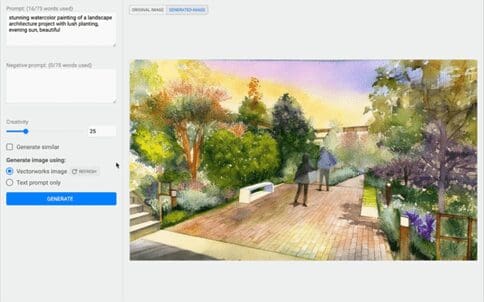
Photo: Vectorworks, Inc.
Sponsored content by Vectorworks
Landscape design is increasingly progressing, and technology’s role in streamlining workflows and enhancing creativity has taken center stage. One of the most notable innovations in this space is artificial intelligence (AI), transforming how professionals design, visualize, and present landscape projects. In Vectorworks, the AI Visualizer is more than just an image generator; it’s a creative companion that ignites your design vision and streamlines aspects of the design process, transforming rough ideas into stunning visuals that ignite client conversations and help propel your projects forward.
AI in Landscape Design: A Game Changer
Traditionally, creating high-quality renderings and presentations required extensive time, skill, and computing power. Landscape design workflows meticulously model designs and wait for time-consuming renders. However, AI-driven tools like the AI Visualizer automate and simplify these processes.
By leveraging AI, landscape design professionals can quickly generate visually compelling representations of their designs, experiment with different styles, and refine their ideas in real-time. This allows them to focus more on creativity and accelerates the design and rendering process, enabling them to move on to the next project faster. In a competitive market, this efficiency helps set them apart and enhances their ability to sell landscape projects more effectively.
Explore, Innovate, and Elevate Your Designs with the AI Visualizer
One of the AI Visualizer’s most significant advantages is its ability to rapidly explore design ideas. You can use a combination of existing drawings — whether hand sketches or digital models — and text prompts to generate a variety of visualizations. This rapid iteration process enables the exploration of different design directions, materials, and lighting schemes, fostering a more dynamic and creative workflow.
With Vectorworks 2025 Update 2, the AI Visualizer offers even more flexibility in creating seamless patterns and textures, useful in their custom material representation in renderings, allowing you to refine and customize visuals with greater precision. New capabilities, such as producing images with alpha channels, make incorporating transparent backgrounds for layered renderings easier—perfect for integrating plants, trees, and other elements seamlessly into your designs. Additionally, the introduction of text prompt recall ensures consistency across projects, making it easier to maintain a cohesive visual style from concept to final presentation. Here’s how it continues to transform your workflow:
- Accelerated Idea Generation: Quickly produce multiple design variations to evaluate different concepts and find the best solution.
- Material and Lighting Exploration: Test different materials and lighting conditions to see how they affect the overall design and atmosphere.
- Dynamic Workflow: Adapt and modify designs on the fly, responding to new insights and client feedback in real-time.
The AI Visualizer is not just a tool for refining existing ideas; it can also spark new design inspiration. AI’s ability to interpret regular prompts for specific expected results and negative prompts to guide the effort in avoiding undesirable results can inspire new design solutions. You can use the AI Visualizer to explore unconventional design elements, materials, and spatial arrangements, pushing the boundaries of creativity and leading to innovative design solutions. Whether you’re looking to experiment with bold concepts or refine specific aspects of your design, the AI Visualizer provides powerful features to support your creative exploration:
- Unconventional Design Elements: Experiment with unique and innovative design elements that might not be immediately obvious through traditional methods.
- Creative Brainstorming: Use the AI Visualizer as a co-pilot in your design brainstorming sessions, generating fresh and original ideas.
- Boundary-Pushing Designs: Break free from conventional design constraints and explore new possibilities.
- Exclusionary Prompt Recognition: Use negative prompts to ensure the AI Visualizer excludes certain items from the result.

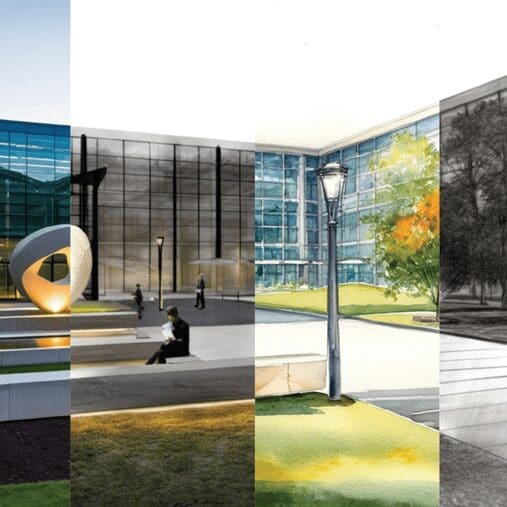
Effective communication of design intent is crucial for gaining client buy-in. AI-generated visualizations can be engaging and impactful, offering an array of styles that can be produced quickly and efficiently. Producing photorealistic, sketch-style, and watercolor visuals allows you to effectively communicate design intent to clients, stakeholders, and the public, fostering better collaboration and buy-in for projects.
By leveraging these AI-driven capabilities, you can create more compelling presentations and ensure your vision is clearly understood:
- Enhanced Visual Communication: Create accurate, compelling, and emotionally engaging visuals.
- Versatile Presentation Styles: Choose from various visual styles to match the project’s needs and the audience’s preferences.
- Improved Collaboration: Use detailed and evocative visuals to facilitate better communication and understanding among project stakeholders.
The Future of AI in Landscape Design
AI is revolutionizing landscape design, empowering professionals to enhance creativity, streamline workflows, and push the boundaries of design. As technology evolves, tools like Vectorworks’ AI Visualizer make it easier than ever to create stunning visuals and impactful presentations, transforming outdoor spaces with efficiency and innovation. By embracing these advancements, landscape design can stay ahead of the curve and deliver extraordinary results that captivate clients.
Don’t miss the latest Vectorworks updates, industry insights, and customer success stories. Subscribe to our newsletter today and stay at the forefront of AI-driven design and next-gen technology.
